Sporadic E:
87.6 1241 BUL BNR Radio Shumen, Shumen/RRTS Venets (shm) 8236
RADIO___ SHUMEN__ 2220km
88.1 1244 ROU Radio România Actualitati, Zalau or Petrosani FF00
and vocal ID between pops
89.0 1250 ROU Radio ZU, Bucuresti (BU) E2AA 2108km
91.1 1251 ROU Magic FM, Iasi/Dealul Paun (IS) E210 2048km **
91.0 1252 ROU Radio România Actualitati, Bihor/Vârful Curcubata
Mare (BH) FF00 1761km
89.9 1253 HNG MR 1 Kossuth Rádió, Komádi (HaB) B203 1649km
Meteor Scatter:
87.7 0446 E RAC 1, Barcelona/Collserola (CAT-B) E251 R--1_---
1311km
87.9 1705 POR RDP Antena 1, Lousã/Trevim (coi) 8201 1588km **
Tropospheric:
103.2 1750 F France Bleu Berry, Bourges/Neuvy (18) Vocal and
jingle ID. Noise free scatter 672km
88.0 1755 F France Culture, Alençon/Mont d'Amain (61) French
YL, as 98.0 498km
103.1 1759 F France Bleu Armorique, Rennes/Saint-Pern (35) Fair
peaks, as 94.7 564km
** Personal Skegness 'First' via this mode
Sporadic E has been hovering around the bottom of band 2 for the
last four days but this is the first time I have had signals strong
enough to get RDS. Coincidentally, Looks like I got my new Körner
9.2 antenna on the roof just in time!
General scatter conditions are hopeless to worse at the moment.
Good DX!
John, Skegness, Lincolnshire (JO03dd) Approx. 1m ASL
skegnessdx.blogspot.co.uk
NOTE: skywaves.info website and associated email addresses have
closed.
Receivers:
Sony XDR-F1HD (tropospheric)
Kenwood KT6040 (sporadic E & meteor scatter)
Icom IC7000 (OIRT)
Conrad RDS Manager
Aerials:
Rooftop Körner 9.2, 8m AGL
Yaesu G-5500 azimuthal/elevation rotator
Software:
RDS Spy v0.99
Monday, 29 April 2013


Friday, 26 April 2013
My New Körner 9:2 Antenna!

"Körner 9:2 Compact" Nine element band 2 beam
Reception had been getting steadily worse for some time, but you can't always easily pinpoint exactly why this is. It could be general reception conditions at the coast. They are constantly variable at the best of times. There was also the possibility that water was getting into the coax or seeping inside the connection box. Reception could also have been worsened when I moved the FM5 from the mast at the bottom of the garden on to the rooftop. There were too many factors to be sure what was happening.
The fact is, something had been wrong for a year or so. The problems really began when the FM5 went on the rooftop. Dozens of continental stations just weren't there anymore. Then I noticed my local Belmont transmitter was a very weak and noisy shadow of its former self one day. We had been having heavy rain showers. That was when I first wondered if water had got inside the connection box. This situation lasted into the next day. Despite a general deterioration of reception, not everything was reduced in strength. Some stations in southern England were even slightly enhanced. So what was happening? I couldn't find any indications that Belmont had been on reduced power and, unfortunately for me, my fear of heights prevented me from climbing on to the roof to take a look at the antenna connections.
Along came the new "Körner 9:2 Compact" antenna during the middle of April, just in time for the sporadic E season. Firstly, I wanted to conduct some general listening tests on the garden to see how it performed, also to compare it with another FM5.
I assembled a makeshift mast on the garden and mounted the 9:2 some three metres above the ground and well away from nearby objects. WOW! I was blown away by the sheer number of continental signals coming in! I could hear lots of German transmitters at fully quieting, noise-free stereo levels. This was incredible! It was probably a foregone conclusion that the Körner 9:2 was going to superior to the FM5, but I expected something more modest, certainly nothing on this scale. I then began to feel convinced that there MUST be something wrong with my rooftop FM5.
Not only could I hear large numbers of continental transmitters, some of which I had not heard for a long time, but I was also aware how electrically quiet the FM band was when tuning on my Sony XDR-F1HD. The entire of band 2 was BLISSFULLY quiet. I could hear fully quieting signals in full stereo with ZERO BARS. I know that's not an accurate way to measure signal levels, but this sort of reception has only been experienced when on DX trips to quiet camp sites. The directivity of the 9:2 was also clearly superior than that of the FM5.
My next listening test was made using another Triax FM5 - not the one on the roof of course. I was expecting to hear a copy of the performance offered by the rooftop FM5, but with reduced signal strengths, but there was a shock. The garden FM5, while noticeably less sensitive and less directional than the 9:2, was still able to give me the same clean band, with the same continental stations I just heard on the 9:2, but with noticeably reduced signal strengths. This was a worry as it indicated that some of my problems with the rooftop FM5 might be due to excessive electrical noise and there was no guarantee that the noise would not be present on the 9:2 once it was on the roof. More tests were needed.
I will skip the details of the tests I carried out, but suffice to say they involved such things as measuring resistances and voltages which might have been getting into the mains earth, potential earth loops, etc. I also isolated the electricity supply to the property and ran the XDR-F1HD from a leisure battery/mains inverter while hooked up to the rooftop FM5. The noise was still there. So it was now becoming clearer that the noise was being received through the air. It is a broadband white noise type of interference which was not registering on the XDR-F1HD's display. It was of such a low level that it was effectively invisible, capable of blocking out the weaker signals. There are also a few other buzzes and PLT type clicks on some frequencies. Suddenly it is looking like this noise might have been responsible for the reduction in performance of the FM5 since it went to its rooftop location. The questions is, what to do now?
When the Körner 9:2 goes on the roof, hopefully this weekend, weather permitting, I hope I hear the same blissfully quiet band that I had when it was under test on the garden. Unfortunately, the reality may be that I will still have to contend with this noise. Further listening tests reveal that the noise is coming from an easterly direction, but there is still a sufficiently low level of background noise which is capable of blocking weak signals, no matter which direction I beam.
---------------------------------------------------------------------------------------
The weekend came and the weather stayed dry. The FM5 was replaced by the Körner 9:2 and I owe a huge thanks to Andrew Webster who took to the roof and swapped the antennas over, completing the entire operation in around three hours.
Overall reception conditions hadn't been great throughout the day and had deteriorated further by the time the 9:2 was on the roof so I didn't expect to hear too much. Even as I type this on Monday morning I can report very poor scatter across band 2.
To begin with I looked for my regular continental transmitters, Lille, northern France at 343 km, Langenberg, western Germany at 505 km and Dudelange, Luxembourg at 573 km. These are receivable virtually all the time here but tend to be noisy during average conditions with occasional noise-free peaks. All of these exhibited noise free signals, peaking regularly via scatter. Other transmitters usually received on a daily basis but always noisy were either noise free or not far behind. These include Amiens (431 km), Rouen (426 km), Reims (516 km km), Chartres (531 km), Le Mans ( 599 km), Brest (604 km) and even Nantes (675 km). A good start!
The path to Germany is a difficult one as my interference comes from the east, but already I can detect signs of improvement with various transmitters in the Nordrhein-Westfalen, Hessen, Rheinland Pfalz and Saarland regions coming in a little better. Here lies the problem though. The anticipated noise levels to the east are worse, as I was fearing. Worse than on the FM5 because of the extra gain of the 9:2, but as I expected, it is easier to steer away from it with the additional directivity provided by the 9:2. Indeed this is the more noticeable attribute and main selling point of the 9:2 beam. The directivity is considerably better than that of the FM5. Because the beamwidth is much narrower, I have had to re-evaluate some of my beam headings as suddenly they aren't quite where I had expected them to be! Two very clear improvements are the Lille transmitter on 88.7 and the Dudelange transmitter on 88.9, which were obscured by the splatter from local Belmont on 88.8. Now 88.7 and 88.9 are splatter-free!
The gain of the 9:2 is also a few dB up on that of the FM5 and has a smoother curve across band 2, whereas the FM5 drops off at the bottom of the band. In the technical specification the 9:2 peaks at 9.6 dBd at 103 MHz and goes no lower than 8.3 dBd at 88 MHz (The K6STI website quotes dBd figures as opposed to dBi which tends to be used by computer modelling software. There is about 2.15 dB difference between the two, but that's still very close). Compare 6.44 dBd and 5.23 dBd, respectively, on the FM5. The giant Körner 15:12 only reaches 9.56 dBd and 7.82 dBd at the same frequency points. Figures ex http://www.ham-radio.com/k6sti/korn1512.htm. Take note though, as stated on the Skywaves email lists, computer plots don't necessarily give a complete picture of the gain figures, but serve as a good guide.
The front-to-back ratio of the 9:2 is superb and I am able to lose many of those annoying signals which come in off the back of the beam, thus opening up numerous frequencies. At it's lowest figure there is a 27dB front-to-back ratio at either end of the band and this rises to the low 30 dBs, peaking at 35dB. I watched the signal bar meter on my Kenwood KT6040 tuner while I rotated 360 degrees while tuned to Belmont. Even 45 degrees off-beam I am able to see a good reduction in the signal, almost nulling it completely at 180 degrees. Belmont starts to break up and becomes noisy at this point, but remember, it is my nearest transmitter and is just too strong to null out completely. At least any propagation should easily get over the top of it now. All other signals are completely nullable here.
If I had ideal circumstances regarding planning and more space to operate larger antenna arrays I would probably have gone for the larger Körner 15:12, but after seeing the specification of the 9:2 I cannot see any meaningful difference, at least on paper, between the 9:2 and the 15:12. Just look at the size of the 9:2 though, it's only four inches longer then the FM5 !!!
It's a pity that the antenna isn't made anymore as I cannot recommend it highly enough. It combines a good level of gain, has superb front to back and offers excellent directivity in an antenna which is just a couple of metres in length. It has made a clear improvement to my band 2 listening. Remember also that, at the time of typing this review, conditions are well below average and I am suffering a lot of QRN when beaming east which is blocking weaker signals from Germany. I may need to consult OFCOM to resolve this.
A big thanks to Sven SM7DTT for the construction and Andy Webster for getting this on the roof. It arrived just in time for the Es too as today I received my first band 2 Es with Bulgaria, Romania and Hungary, received up to 93.5 MHz.
Good DX!
John
First Es Of The Season
At 14:00 GMT today I heard what appeared to be very weak Es at the bottom of band 2. There was something on 87.6 and on 88.0, behind WDR5 from Bonn. The low end of the band was noisy too.
I can only presume these were Es. The DX Maps website was reporting a high MUF at the time and 6m was active with Es.
So, an early start to the season, but we cannot assume this will be an indication of things to come. Es are unpredictable. In fact, I have heard CBers and 10m DXers reporting a very poor start to the Es this month where they have usually been received more regularly by now.
Good DX!
John
I can only presume these were Es. The DX Maps website was reporting a high MUF at the time and 6m was active with Es.
So, an early start to the season, but we cannot assume this will be an indication of things to come. Es are unpredictable. In fact, I have heard CBers and 10m DXers reporting a very poor start to the Es this month where they have usually been received more regularly by now.
Good DX!
John
Saturday, 23 March 2013
Never Enough Time
It's been a while since I made an entry to this blog. Work and other commitments have taken over my life for the last few weeks, but that's good news of course. Time for a catch-up soon hopefully and I will fill in the blanks.
There are log updates for band 2 and medium wave, though conditions haven't been too inspiring. A half decent spell of tropo occurred earlier in March. Tropo seems to be a rare breed these days but that's probably understandable due to the time of the year and this awful extended winter we are having.
Most of my computer time has been devoted to updating my Google Sites website, but I am discovering an ever increasing amount of drawbacks with this, not least the lack of a site backing-up facility. While Google Sites is a free service I don't expect to have everything handed to me on a plate for nothing, but you'd think there would at least be a basic backing-up facility like you have with Blogger. I have therefore been looking at other free sites like Wix, but it seems they don't offer this either. I took a brief look at Webstarts, who offer HTML editing and site backups, but the control panel is so flaky it hurts. The free Webs service is also too basic for my needs. I really like the Wix system though. It's very easy to use and doesn't seem to fall over.
So it looks like I will still be using a combination of different facilities to achieve my aim. Blogger is a personal favourite - it's simple, but so easy to use and does the job well. I have tried platforms like Wordpress and Joomla in the past but they have always been hacked into, despite keeping the software and security side up-to-date. I will probably go with Wix for static web pages while using Photobucket, Picasa, Youtube, Box and Mediafire for various files, plus the excellent Google Drive for documents.
There are log updates for band 2 and medium wave, though conditions haven't been too inspiring. A half decent spell of tropo occurred earlier in March. Tropo seems to be a rare breed these days but that's probably understandable due to the time of the year and this awful extended winter we are having.
Most of my computer time has been devoted to updating my Google Sites website, but I am discovering an ever increasing amount of drawbacks with this, not least the lack of a site backing-up facility. While Google Sites is a free service I don't expect to have everything handed to me on a plate for nothing, but you'd think there would at least be a basic backing-up facility like you have with Blogger. I have therefore been looking at other free sites like Wix, but it seems they don't offer this either. I took a brief look at Webstarts, who offer HTML editing and site backups, but the control panel is so flaky it hurts. The free Webs service is also too basic for my needs. I really like the Wix system though. It's very easy to use and doesn't seem to fall over.
So it looks like I will still be using a combination of different facilities to achieve my aim. Blogger is a personal favourite - it's simple, but so easy to use and does the job well. I have tried platforms like Wordpress and Joomla in the past but they have always been hacked into, despite keeping the software and security side up-to-date. I will probably go with Wix for static web pages while using Photobucket, Picasa, Youtube, Box and Mediafire for various files, plus the excellent Google Drive for documents.
Saturday, 23 February 2013
Skywaves Chat now on Skype
From today, Skywaves members are able to access the new Skywaves Chat room on Skype. The new room will provide instantaneous DX alerts to all who use it, and that doesn't just include members of the Skywaves Yahoo forums. It's open to non-members worldwide too. There is much to be gained by all users to alert others of impending DX conditions.
Members of the Skywaves Yahoo Groups recently suggested that there should be a chat room, as used to exist several years ago.
There was also a suggestion to open a Skywaves page on Facebook, primarily with a view to providing instant messaging, but also to promote Skywaves and indeed the hobby in general to the DX community. A Facebook group would also provide a much simpler way to share audio and video than that which exists on the current Yahoo Groups. Facebook is not for everybody though. Some people refuse to get involved with Facebook. Personally, I am not a fan myself, in fact I detest the thing, but it does give us a great way to share information and keep in touch with friends. People can to choose who they want to communicate with and who they want to block, should that become necessary. As many people know though, Facebook has a habit of changing how it looks and even altering your personal settings, on quite a regular basis too, so there is a need to keep on top of that. It's the excellent promotional base which Facebook offers, so there is also a lot to be gained from using it. It's completely free to use too.
Skype is another excellent platform which offers instant messaging. Users can share instant DX alerts in several ways too! Either in individual groups or 'globally' to all room users. You can also stream live audio and video to individuals, several chosen users at the same time, or to the entire room, which makes it an even more versatile system. Skype is free to use though may take a little getting used to for some. It's really very easy to use!
The new Chat room has only been operational for 24 hours and we have already seen people from the USA, Turkey and from across the UK and Europe accessing the group. It is also possible to open smaller rooms for people to exchange information on a more localised basis, should a DX opening exist on a much smaller and more localised level which might be irrelevant to users who are along way from the action, but it's clear to see the benefits when we all converge in one global community to share our experiences and friendship.
Just install the latest version of Skype on your computer, mobile phone, etc. and search for "SkywavesDX".
Members of the Skywaves Yahoo Groups recently suggested that there should be a chat room, as used to exist several years ago.
There was also a suggestion to open a Skywaves page on Facebook, primarily with a view to providing instant messaging, but also to promote Skywaves and indeed the hobby in general to the DX community. A Facebook group would also provide a much simpler way to share audio and video than that which exists on the current Yahoo Groups. Facebook is not for everybody though. Some people refuse to get involved with Facebook. Personally, I am not a fan myself, in fact I detest the thing, but it does give us a great way to share information and keep in touch with friends. People can to choose who they want to communicate with and who they want to block, should that become necessary. As many people know though, Facebook has a habit of changing how it looks and even altering your personal settings, on quite a regular basis too, so there is a need to keep on top of that. It's the excellent promotional base which Facebook offers, so there is also a lot to be gained from using it. It's completely free to use too.
Skype is another excellent platform which offers instant messaging. Users can share instant DX alerts in several ways too! Either in individual groups or 'globally' to all room users. You can also stream live audio and video to individuals, several chosen users at the same time, or to the entire room, which makes it an even more versatile system. Skype is free to use though may take a little getting used to for some. It's really very easy to use!
The new Chat room has only been operational for 24 hours and we have already seen people from the USA, Turkey and from across the UK and Europe accessing the group. It is also possible to open smaller rooms for people to exchange information on a more localised basis, should a DX opening exist on a much smaller and more localised level which might be irrelevant to users who are along way from the action, but it's clear to see the benefits when we all converge in one global community to share our experiences and friendship.
Just install the latest version of Skype on your computer, mobile phone, etc. and search for "SkywavesDX".
Wednesday, 20 February 2013
My Fantasy VHF Band 2-FM SDR Receiver
After chatting to DX friends about the potential for a Super-DX Receiver for the VHF FM broadcast band (band 2) we accepted the fact that we're not quite close in getting that ideal DX machine. No, we're not quite there yet, but the technology is already here now. We just need the right software.
A good example of good hardware might be the Perseus FM+ add-on to the excellent Perseus SDR receiver. This piece of genius might have the necessary specification and performance a band 2 DXer needs, but the software, as good as it may be, doesn't quite meet our needs. So what do we need?
Speaking personally, I want a receiver which is able to scan up and down the band by itself, automatically storing instances of RDS PI and PS data. I need to be able to set various parameters such as: Continuous recording; Timer recording; Audio triggers for auto-recording; Date; Time; Frequency; Fully programmable scan/search and the ability to 'tick boxes' to select the specific data you wish to 'capture'. Above all, the RDS decoding MUST be highly sensitive and accurate at low signal levels.
Taking this a step further, there will be an internet connection to an online DX cluster such as FM List, where the captured data is automatically uploaded. This data will be cross-referenced to station lists and matched to automatically create loggings, thus producing an online logbook.
There's nothing like sitting in front of the receiver and tuning live, catching the DX as it happens, but during times when I might be away from the receiver or away from home, I would like to have the option to set the receiver recording the band and DXing for me. Before you say anything ... No, I really don't believe this is cheating!
I want to be able to play back the recording of the IF at my leisure so I can DX in real-time. Yes, I know, technically that's not "real-time", but you know what I mean. Such things are already happening in the world of amateur radio with many data modes. With current technology it is possible to record a maximum IF bandwidth of 4MHz of IF, but the VHF band 2 broadcast range is 20MHz wide. Two possible solutions would be: 1. To have the receiver scanning in blocks of of 4MHz, rapidly, like a kind of switched multiplex; 2. The software should be capable of running several instances of the software, simultaneously, without making my computer fall over. SDR# can already achieve the latter with the Climax DTV300 dongle!
Sadly, the DTV300 has fallen short on performance for some DXers, however. looking at the various SDR-control software packages currently available, one would assume the future looks quite rosy for us band 2 DXers. We still have to remind ourselves that this is a very niche little interest in what is already quite a niche hobby. There would be little financial incentive for a company to produce anything suitable on a small scale. In the meantime, we'll just have to rely on those clever programmers in our hobby who might be able to come up with something which exactly suits our needs! I hope we don't have to wait too long before such a fantasy DX machine will be readily available to us.
There might be a few bits and pieces I've forgotten and so I will add things along the way. For now, this is just a quick summary.
A good example of good hardware might be the Perseus FM+ add-on to the excellent Perseus SDR receiver. This piece of genius might have the necessary specification and performance a band 2 DXer needs, but the software, as good as it may be, doesn't quite meet our needs. So what do we need?
Speaking personally, I want a receiver which is able to scan up and down the band by itself, automatically storing instances of RDS PI and PS data. I need to be able to set various parameters such as: Continuous recording; Timer recording; Audio triggers for auto-recording; Date; Time; Frequency; Fully programmable scan/search and the ability to 'tick boxes' to select the specific data you wish to 'capture'. Above all, the RDS decoding MUST be highly sensitive and accurate at low signal levels.
Taking this a step further, there will be an internet connection to an online DX cluster such as FM List, where the captured data is automatically uploaded. This data will be cross-referenced to station lists and matched to automatically create loggings, thus producing an online logbook.
There's nothing like sitting in front of the receiver and tuning live, catching the DX as it happens, but during times when I might be away from the receiver or away from home, I would like to have the option to set the receiver recording the band and DXing for me. Before you say anything ... No, I really don't believe this is cheating!
I want to be able to play back the recording of the IF at my leisure so I can DX in real-time. Yes, I know, technically that's not "real-time", but you know what I mean. Such things are already happening in the world of amateur radio with many data modes. With current technology it is possible to record a maximum IF bandwidth of 4MHz of IF, but the VHF band 2 broadcast range is 20MHz wide. Two possible solutions would be: 1. To have the receiver scanning in blocks of of 4MHz, rapidly, like a kind of switched multiplex; 2. The software should be capable of running several instances of the software, simultaneously, without making my computer fall over. SDR# can already achieve the latter with the Climax DTV300 dongle!
Sadly, the DTV300 has fallen short on performance for some DXers, however. looking at the various SDR-control software packages currently available, one would assume the future looks quite rosy for us band 2 DXers. We still have to remind ourselves that this is a very niche little interest in what is already quite a niche hobby. There would be little financial incentive for a company to produce anything suitable on a small scale. In the meantime, we'll just have to rely on those clever programmers in our hobby who might be able to come up with something which exactly suits our needs! I hope we don't have to wait too long before such a fantasy DX machine will be readily available to us.
There might be a few bits and pieces I've forgotten and so I will add things along the way. For now, this is just a quick summary.
Sunday, 3 February 2013
Good signal from China 1521

Equipment used: Perseus SDR with small garden flag antenna (3m x 7m x 3m), beaming approximately 345 degrees (north-north-west).
Sounds like this afternoon would have been a good one to be out with the beverage!
Tuesday, 29 January 2013
Configuring SDR Radio v2 with Climax Digital DTV300 USB Dongle
Note: New software versions have been released since this article was written and so the following may not be 100% applicable if you use newer software versions than those mentioned below.
Please note that some of the links have changed or are no longer used. I do not plan to update this article. "This is an ex-article. It has ceased to be", as the great Monty Python might have said.
I have been asked to detail the installation procedure of my Climax Digital DTV300 USB dongle and the SDR-Radio v2 software. My own experiences may be different to other people's, but this is the way I got it to work, after a lot of trial and error.
My knowledge of driver installation could be written on the back of a postage stamp, so if there is anything amiss with my explanation below, my apologies - I would appreciate feedback or corrections if so.Some of this is from memory but I have checked through each step as much as I can.
The SDR Radio software has been designed to operate several makes of dongle and so needs to be pointed in the direction of the appropriate drivers. In my case, I needed the "RTL USB" drivers for my Climax Digital DTV300. Detailed instructions can be found here, though this did not work for me to begin with. These instructions told me to copy three dll files (page) into the SDR Radio directory in Windows. I did this but it was unsuccessful. I hadn't realised initially that Windows was unable to install the drivers by itself.
The solution was to obtain a programme called "Zadig", an alternative driver installer to the one used within Windows. Zadig uses Gzip compression and so needs to be expanded to your computer. I believe most decompression tools are capable of expanding .gz files, but if you don't have one, use the 7zip software as I did.
Unfortunately for me, the necessary "zadig.exe" file was not present in the folder once extracted. I found this file by accident when trying to install SDR# software. Step-by-step instructions on how to install SDR# with the RTL USB drivers can be found here. So, the whole procedure for me was as follows:
Download and install SDR Radio software. I used Preview 6 (build 1279)
Copy these three files (page):
Plug in the Climax Digital DTV3000 USB stick, but do not act on any prompts yet.also make sure
you do not run the software which came with the DTV300. Uninstall it and restart Windows if
you already have.
The next part involved me downloading SDR# software so I could obtain the Zadig software with which to install the RTL USB drivers.
Download the SDR# "sdr-install" test file here (page)
Extract the file and look within the "sdr-install" directory
Run the "install" batch file. This can take a minute or two and appeared to stall
The file "zadig.exe" will appear in the folder. Run it and follow the instructions here.
Run SDR Radio Console v2 and in the "Home" menu (top left) press the bue play button. In the
"Select Radio" window you should see the PROlectrix driver. Select this and click "Start"
With any luck you should now be able to access your DTV300 via the SDR Radio software.
I wouldn't be surprised if you come across a discrepancy or two above, depending on your computer's software, etc. Remember, what worked for me might not work for you, but hopefully there will be something useful in the above. Maybe it might just work first time!
Good luck!
Please note that some of the links have changed or are no longer used. I do not plan to update this article. "This is an ex-article. It has ceased to be", as the great Monty Python might have said.
I have been asked to detail the installation procedure of my Climax Digital DTV300 USB dongle and the SDR-Radio v2 software. My own experiences may be different to other people's, but this is the way I got it to work, after a lot of trial and error.
My knowledge of driver installation could be written on the back of a postage stamp, so if there is anything amiss with my explanation below, my apologies - I would appreciate feedback or corrections if so.Some of this is from memory but I have checked through each step as much as I can.
The SDR Radio software has been designed to operate several makes of dongle and so needs to be pointed in the direction of the appropriate drivers. In my case, I needed the "RTL USB" drivers for my Climax Digital DTV300. Detailed instructions can be found here, though this did not work for me to begin with. These instructions told me to copy three dll files (page) into the SDR Radio directory in Windows. I did this but it was unsuccessful. I hadn't realised initially that Windows was unable to install the drivers by itself.
The solution was to obtain a programme called "Zadig", an alternative driver installer to the one used within Windows. Zadig uses Gzip compression and so needs to be expanded to your computer. I believe most decompression tools are capable of expanding .gz files, but if you don't have one, use the 7zip software as I did.
Unfortunately for me, the necessary "zadig.exe" file was not present in the folder once extracted. I found this file by accident when trying to install SDR# software. Step-by-step instructions on how to install SDR# with the RTL USB drivers can be found here. So, the whole procedure for me was as follows:
Download and install SDR Radio software. I used Preview 6 (build 1279)
Copy these three files (page):
- libusb-1.0.dll
- rtlsdr.dll
- SDRSourceRTL2832U.dll
Plug in the Climax Digital DTV3000 USB stick, but do not act on any prompts yet.also make sure
you do not run the software which came with the DTV300. Uninstall it and restart Windows if
you already have.
The next part involved me downloading SDR# software so I could obtain the Zadig software with which to install the RTL USB drivers.
Download the SDR# "sdr-install" test file here (page)
Extract the file and look within the "sdr-install" directory
Run the "install" batch file. This can take a minute or two and appeared to stall
The file "zadig.exe" will appear in the folder. Run it and follow the instructions here.
Run SDR Radio Console v2 and in the "Home" menu (top left) press the bue play button. In the
"Select Radio" window you should see the PROlectrix driver. Select this and click "Start"
With any luck you should now be able to access your DTV300 via the SDR Radio software.
I wouldn't be surprised if you come across a discrepancy or two above, depending on your computer's software, etc. Remember, what worked for me might not work for you, but hopefully there will be something useful in the above. Maybe it might just work first time!
Good luck!
Climax Digital DTV300 & SDR-Radio
I just purchased a Climax Digital DTV300 dongle. Wow! How on earth can an El Cheapo £15 "DVB-T/Freeview/FM Radio /DAB Receiver" do so much and perform so well?
![]()
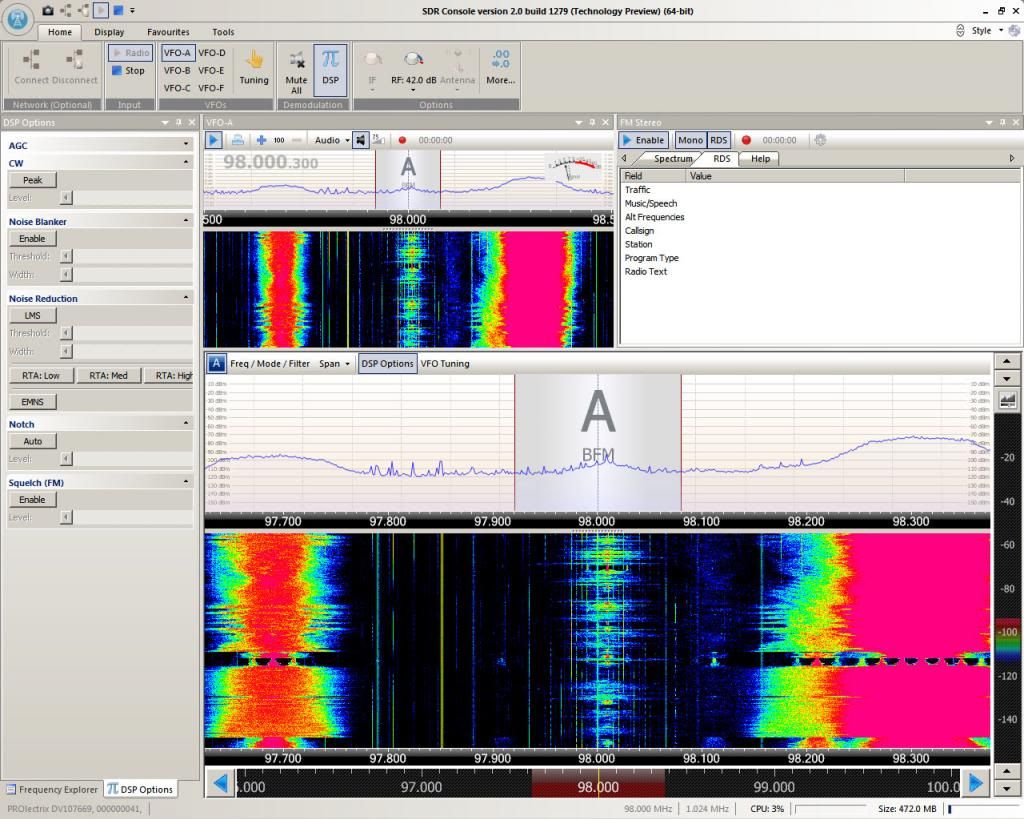
Well, it can if it is controlled by good software. From comments made so far, I understand these units don't cope too well in strong signal areas, however, here on the east coast I don't have that problem, thankfully, so the DTV300 handles very well, but I discovered its capabilities as a worthy VHF band 2 DX machine are very close to those of my Sony XDR-F1HD.
Don't install the software which comes with this USB dongle if you want to get the best band 2 performance. Instead, try using something like SDR Radio or SDR# as these offer much more control than the bundled software. Both of these are free and each have their own advantages. Personally, I like the SDR Radio software as, although rather complicated at first sight, does a lot, lot more.
My interest in these dongles was aroused a couple of weeks ago when I read that they can be used as SDRs (Software Defined Radios) on the the VHF band 2 FM broadcast spectrum, allowing up to 2 MHz of recording bandwidth. I wasn't convinced, initially, until I read some reports on the Skywaves FM Forum stating just how good they actually were. I was advised to get one to have a play, so I did.
To begin with, the installation of the software isn't exactly straight-forward, though there is a lot of help documented on various websites and forums, such as the SDR Radio Forum and the SDR Radio website. It took me a good few hours to work out how to complete the installation as the appropriate drivers were not initially found by the software, which needs to be told where to find the appropriate drivers.
Once up and running, I was blown away by the DTV300's performance on band 2. It was actually as good as that of my Sony XDR-F1HD and with only subtle differences. The DTV300 probably doesn't quite match up to the XDR-F1HD's superb selectivity - even when using the software's fully variable bandwidth, but it wasn't far behind. I was more impressed by the DTV300's gain. The XDR-F1HD has a slight mute on weak signals, but soon opens up once a very weak signal increases in strength. The DTV300 doesn't have this mute when used with the SDR Radio and SDR# software. Or at least you can disable this annoyance if it has. The results were better access and improved audio clarity on very weak signals which is somewhat reduced on the XDR-F1HD. Once the signal increases, then the XDR-F1HD probably wins - but not by much.
I am primarily looking at the DTV300 from a DX perspective, but the audio quality was also good when used with SDR-Radio and SDR#. The DTV300 also has RDS capability. The sensitivity threshold for RDS data is set too high, in my opinion and I wondered if it might be possible to lower this so RDS forms accurately with lower signal levels. If this can be done then you have quite a beast of a DX receiver.
Recording Demonstration:
Click here for a recording, demonstrating the difference in reception between the SDR Radio/DTV300 setup and the Sony XDR-F1HD. The station I used in this demonstration was RTBF La Premiere, Tournai, on 106.0 MHz. I deliberately beamed slightly south of the direction of Tournai so you can hear the splatter of semi-local Kiss FM from Stoke Holy Cross on 106.1 (wide and splattery). I also had the SDR Radio set to its widest IF bandwidth of 192 kHz. The brighter sounding audio is that of the DTV300 via the SDR Radio software, while the more muffled sounding audio is the Sony XDR-F1HD, which starts off the recording. The antenna in use is a Triax FM5, on the roof of the bungalow, beaming south-south-east.
Don't install the software which comes with this USB dongle if you want to get the best band 2 performance. Instead, try using something like SDR Radio or SDR# as these offer much more control than the bundled software. Both of these are free and each have their own advantages. Personally, I like the SDR Radio software as, although rather complicated at first sight, does a lot, lot more.
My interest in these dongles was aroused a couple of weeks ago when I read that they can be used as SDRs (Software Defined Radios) on the the VHF band 2 FM broadcast spectrum, allowing up to 2 MHz of recording bandwidth. I wasn't convinced, initially, until I read some reports on the Skywaves FM Forum stating just how good they actually were. I was advised to get one to have a play, so I did.
To begin with, the installation of the software isn't exactly straight-forward, though there is a lot of help documented on various websites and forums, such as the SDR Radio Forum and the SDR Radio website. It took me a good few hours to work out how to complete the installation as the appropriate drivers were not initially found by the software, which needs to be told where to find the appropriate drivers.
Once up and running, I was blown away by the DTV300's performance on band 2. It was actually as good as that of my Sony XDR-F1HD and with only subtle differences. The DTV300 probably doesn't quite match up to the XDR-F1HD's superb selectivity - even when using the software's fully variable bandwidth, but it wasn't far behind. I was more impressed by the DTV300's gain. The XDR-F1HD has a slight mute on weak signals, but soon opens up once a very weak signal increases in strength. The DTV300 doesn't have this mute when used with the SDR Radio and SDR# software. Or at least you can disable this annoyance if it has. The results were better access and improved audio clarity on very weak signals which is somewhat reduced on the XDR-F1HD. Once the signal increases, then the XDR-F1HD probably wins - but not by much.
I am primarily looking at the DTV300 from a DX perspective, but the audio quality was also good when used with SDR-Radio and SDR#. The DTV300 also has RDS capability. The sensitivity threshold for RDS data is set too high, in my opinion and I wondered if it might be possible to lower this so RDS forms accurately with lower signal levels. If this can be done then you have quite a beast of a DX receiver.
Recording Demonstration:
Click here for a recording, demonstrating the difference in reception between the SDR Radio/DTV300 setup and the Sony XDR-F1HD. The station I used in this demonstration was RTBF La Premiere, Tournai, on 106.0 MHz. I deliberately beamed slightly south of the direction of Tournai so you can hear the splatter of semi-local Kiss FM from Stoke Holy Cross on 106.1 (wide and splattery). I also had the SDR Radio set to its widest IF bandwidth of 192 kHz. The brighter sounding audio is that of the DTV300 via the SDR Radio software, while the more muffled sounding audio is the Sony XDR-F1HD, which starts off the recording. The antenna in use is a Triax FM5, on the roof of the bungalow, beaming south-south-east.
Saturday, 26 January 2013
G1VVP / Skegness DX - Site Reorganisation
I have been paying for domains and hosting since the turn of the century ("millennium", actually - doesn't that make me sound incredibly old?!! :O) I got to thinking that this was unnecessary in this day and age as there are so many free online sites where you can host your hobby web pages and store many types of file, each without cost. Why bother paying? When I added together the cost of my domains and hosting packages I worked out that I was paying about £150 per year. "Stop" I told myself.
Things used to be different. For instance, the Skywaves domain and hosting was bought when Skywaves began to embrace online technology around the year 2000 and, reluctantly, ceased to produce its monthly printed bulletin shortly afterwards, running entirely via electronic media on the web. Back then we had a web presence with a club website and there were two Yahoo forums. The move proved to be a good one in some ways. For a start, it encouraged many more members to join and offered greater ease for members to contribute and interact. It was free! Whereas the cost of the Skywaves domain and its hosting was mostly covered by voluntary donations to begin with. These slowly dried up. Personally, I was sad to see the end of the hard copy of Skywaves - something you could actually touch and smell, but that's 'progress' for you and it did turn out to be worthwhile, growing the membership substantially. For me though, it was the same as abandoning your CD or vinyl collection in favour of mp3 files. Sadly necessary in a way, but nowhere near as romantic.
During Christmas 2012 I also decided to begin the transition of moving my own personal and paid-for web pages to a free blog and make use of free file sharing sites. I looked at Wix to begin with, which is an excellent free site-builder, but I quickly opted for something simpler and settled here with Blogspot. I also use various other free filesharing sites such as Box (DX recordings), Mediafire (larger files such as Perseus recordings), Photobucket (photos, obviously) and YouTube (videos). I have also just started to use Google Sites "here" so I can keep an online reference and backup of my personal DX logs and recording links. It makes sense and I really don't see the point in continuing to pay for something simple which is only hobby-related. This whole transition may be a lengthy process though and I will add a few bits and pieces each week.
The only service I feel I still need to pay for is a personal email address, which I find can have a few useful advantages over free email services such as Gmail or Yahoo. Mail forwarding is one of them and this is less than straight-forward with services such as Gmail, though I have to give praise to Gmail for their excellent spam filtering.
So, over the coming weeks and months, I plan to add a lot more media to my "Google Site", including lots of personal DX recordings (I discovered a huge stack of these this afternoon which were previously missing), photos and various other related files.
Things used to be different. For instance, the Skywaves domain and hosting was bought when Skywaves began to embrace online technology around the year 2000 and, reluctantly, ceased to produce its monthly printed bulletin shortly afterwards, running entirely via electronic media on the web. Back then we had a web presence with a club website and there were two Yahoo forums. The move proved to be a good one in some ways. For a start, it encouraged many more members to join and offered greater ease for members to contribute and interact. It was free! Whereas the cost of the Skywaves domain and its hosting was mostly covered by voluntary donations to begin with. These slowly dried up. Personally, I was sad to see the end of the hard copy of Skywaves - something you could actually touch and smell, but that's 'progress' for you and it did turn out to be worthwhile, growing the membership substantially. For me though, it was the same as abandoning your CD or vinyl collection in favour of mp3 files. Sadly necessary in a way, but nowhere near as romantic.
During Christmas 2012 I also decided to begin the transition of moving my own personal and paid-for web pages to a free blog and make use of free file sharing sites. I looked at Wix to begin with, which is an excellent free site-builder, but I quickly opted for something simpler and settled here with Blogspot. I also use various other free filesharing sites such as Box (DX recordings), Mediafire (larger files such as Perseus recordings), Photobucket (photos, obviously) and YouTube (videos). I have also just started to use Google Sites "here" so I can keep an online reference and backup of my personal DX logs and recording links. It makes sense and I really don't see the point in continuing to pay for something simple which is only hobby-related. This whole transition may be a lengthy process though and I will add a few bits and pieces each week.
The only service I feel I still need to pay for is a personal email address, which I find can have a few useful advantages over free email services such as Gmail or Yahoo. Mail forwarding is one of them and this is less than straight-forward with services such as Gmail, though I have to give praise to Gmail for their excellent spam filtering.
So, over the coming weeks and months, I plan to add a lot more media to my "Google Site", including lots of personal DX recordings (I discovered a huge stack of these this afternoon which were previously missing), photos and various other related files.
Subscribe to:
Posts (Atom)